Why I Built This
Every time we share a PDF document, we are often sharing a lot more data than we realize. I built this tool because I noticed how easy it is for companies, schools, and marketing platforms to embed hidden tracking links, interactive form checkers, and detailed background metadata inside standard PDF files. Whenever someone clicks an innocent-looking hyperlink in a document, their background information can easily be logged by third-party tracking scripts.
I wanted a clean, absolute way to sanitize my documents before hitting "send" without relying on sketchy online converters that upload your private files to their remote servers. I needed something that kept my data completely under my control. Since I couldn't find a lightweight, cross-platform tool that did exactly what I wanted with complete transparency, I decided to build it myself.
What ClearLink-PDF Does
ClearLink-PDF is an open-source security application designed to strip away invisible trackers, active hyperlinks, nested page annotations, and embedded system metadata entirely from your files. Whether you have a single document or a large batch of files, the application strips out the tracking elements while leaving your visible layout completely untouched.
Beyond link removal, the tool also cleans out system tags like the author's name, creation software, editing timestamps, and embedded table of contents arrays that could potentially point back to your local identity.
Key Features Checklist
- Removes all visible and hidden hyperlinks from PDF pages.
- Purges sensitive metadata including author, title, creator, and timestamps.
- Deletes structural bookmarks and tables of contents that might contain trackable links.
- Compresses file sizes using object table optimization and deflation.
- Extracts plain text and embedded images into organized local folders.
- Merges multiple PDFs into a single document or splits them into individual pages.
- Rotates pages and protects files with robust AES-256 encryption.
- Works entirely offline to ensure absolute data privacy.
How It Works
The core engine uses a deliberate "pointer-based" cleaning cycle. When you upload or choose a document, the application reads the file's low-level dictionary object structure page by page. Instead of searching for text strings, it explicitly goes into the structural annotation layers where interactive links are registered.
To do this across different devices, I implemented two separate engines that follow the exact same logic. For the web portal, everything runs locally in your browser memory using pdf-lib. For the desktop interface and the automation engine, the code relies on PyMuPDF to modify the binary cross-reference tables directly. This double-check ensures that even links hiding inside interactive form fields or complex nested formats are wiped clean.
Technology Stack Overview
| Layer | Technology | Purpose |
|---|---|---|
| Frontend | HTML5, CSS3, JavaScript, pdf-lib | Builds the responsive web interface and processes PDFs locally in the browser. |
| Backend | Python, PySide6, pyTelegramBotAPI, PyMuPDF, Flask | Powers the desktop graphical interface and manages the automated Telegram bot logic. |
| Database | None | Does not store any user files or data to ensure absolute privacy. |
| Deployment | Vercel | Hosts the application resources and executes serverless webhook functions. |
Three Ways to Use
To make the tool accessible no matter your workflow, I built three distinct versions depending on where you are working.
1. The Web Portal
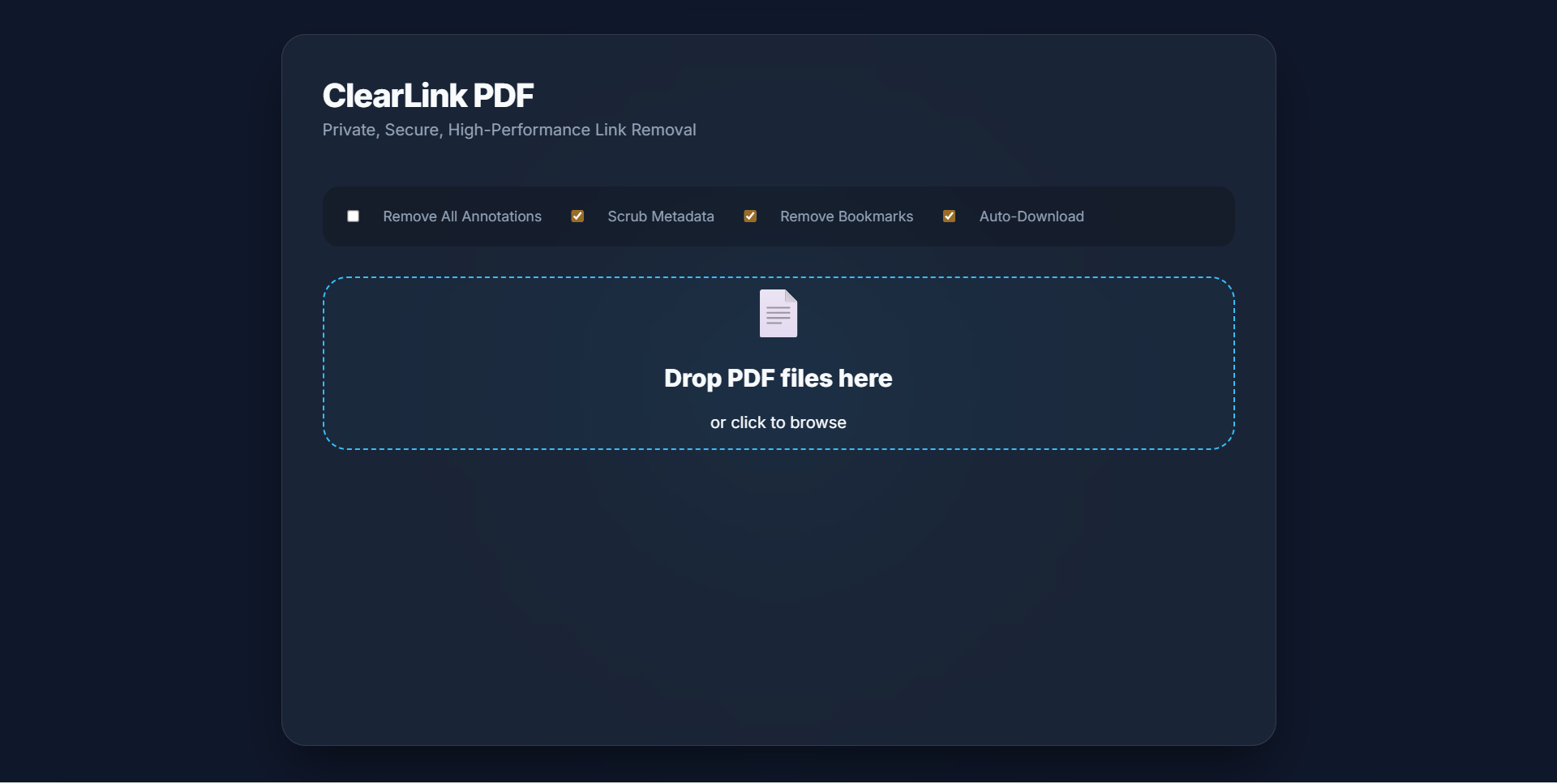
The web application is a static, dark-themed interface built using glassmorphism styling principles. Because it runs entirely client-side, your documents never touch an external server. You just drag your files onto the screen, check your cleanup settings, and immediately download the polished results.
2. The Native Desktop App
For local batch file management, I built a desktop GUI application using PySide6. It features full high-DPI scaling display configurations, allows you to pick specific output directories, and lets you drag and drop local files seamlessly into your desktop workspace panel.
3. The Telegram Bot
When you need to clean a document on your phone, you can forward files directly to the automated Telegram bot channel. It uses inline buttons to trigger various actions like text extraction, compression, splitting, and link stripping, handling the heavy lifting using serverless webhook routing.
Challenges I Faced
Building a cross-platform engine brought along a few technical hurdles. The trickiest issue was a classic deletion loop bug. When iterating through a PDF's annotations sequentially, deleting an item shifts all subsequent indexes forward by one space. If you use a standard forward loop, your application will skip every other link. I resolved this issue by writing backward-looping array traversals that safely delete link nodes without throwing off the structural indexes.
"Iterating forwards during list modifications causes index shifts. Reversing the loop direction is the simplest, most elegant fix for pointer array safety."
Another challenge came up when deploying the automated Telegram bot handler as a serverless script. Free cloud functions enforce a strict 10-second processing window limit. This timeout caused errors when handling massive multi-page files. To address this constraint, I optimized the Python engine's garbage collection parameters, moving from basic file copies to highly compressed object table rewriting.
Try It Yourself & Developer Setup
The complete project is open source and available for everyone to use, modify, or host independently. Get started with the links below:
- Launch ClearLink-PDF: Open the Live Web Tool
- Source Code: View the GitHub Repository
1. Repository Installation
Clone the repository to your local machine and install the required dependencies:
git clone https://github.com/pavnxet/ClearLink-PDF.git
cd ClearLink-PDF
pip install -r requirements.txt
2. Running the Software
To run the desktop GUI layout locally:
python main.pyTo start the Telegram bot channel (requires setting up a token with BotFather):
set BOT_TOKEN=your_telegram_bot_token_here
python telegram_bot.py
To launch a local web server for testing the Web Portal interface on port 3000:
python -m http.server 3000 --directory web3. Vercel Serverless Deployment
Deploy the Flask bot webhooks serverlessly to Vercel using their CLI tool:
npm install -g vercel
vercel login
vercel
vercel --prod
What's Next
I am planning to expand the local engine to support smart pattern recognition. This feature will let users scan text content for tracking pixels or malicious redirect URLs, instead of just wiping out the metadata and link layers entirely. I also want to optimize the web portal's rendering speed to better support massive, image-heavy textbooks.
If you want to contribute new code changes, optimize the script workflows, or report a bug, feel free to open a pull request directly on the repository page on GitHub.